technogeek75
technogeek75

@help I dont see ‘Import’ on the Posts page. Where exactly can I find it? I want to test importing from Substack to see how it is working.

>Micro.blog can import from WordPress, Medium, Tumblr, Ghost, Substack, Write.as, Twitter, and Markdown files. To upload a file from one of those platforms, go to Micro.blog on the web and click Posts → “…” → Import.

via Indie Microblogging

Your help is great appreciated.

|
Embed
Progress spinner
rscottjones
rscottjones

@technogeek75 on the web, go to posts, then click the three dot menu to the right of your domain name in the top bar.

cc: @help

|
Embed
Progress spinner
technogeek75
technogeek75

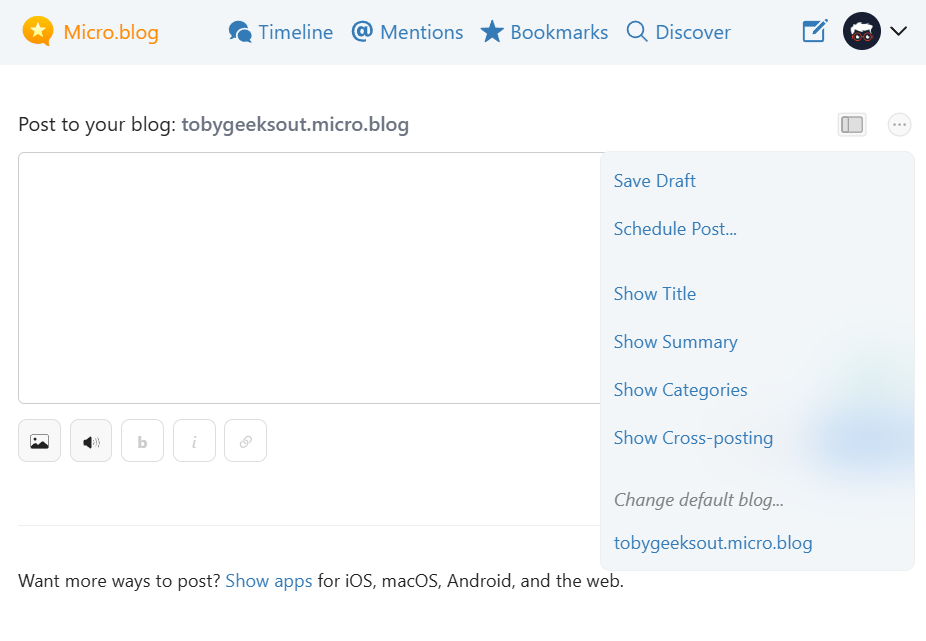
@rscottjones That is what I am seeing right now. I don’t see ‘Import,’ unless I’ve overlooked something, have I?

|
Embed
Progress spinner
rscottjones
rscottjones

@technogeek75 your interface looks a bit different than mine (my three dot menu is at the very top), as I have multiple domains hosted. I’m guessing that link may have gotten borked during the recent post editor upgrade. Perhaps it’s hidden under the down arrow near your profile photo?

|
Embed
Progress spinner
technogeek75
technogeek75

@rscottjones I dont have any domains, hosted, just a native, vanilla blog. I will wait to see if anyone says something about it! Perhaps, @manton knows where I can find it…

|
Embed
Progress spinner
manton
manton

@technogeek75 @rscottjones There is a separate “…” menu on the Posts page (with the list of all your blog posts) that’s different than the one on the new post page. The one on the Posts page should have the Import item.

|
Embed
Progress spinner
technogeek75
technogeek75

@manton Ahh, I found it under Blog Settings, then a three-dot menu next to my blog name, which listed all platforms to import posts from. I don’t want that. I thought we could import a single blog post from other platforms to post on micro.blog.

|
Embed
Progress spinner