jarrod
jarrod

By the way, for folks using my Generate Alt Text with OpenAI Vision shortcut, you can update it to use the new gpt-4o model super easily by just changing the name of the model in this action:

A computer screen displays an instruction for creating alt text with OpenAI Vision software. Various setting options are visible on the right-hand side of the interface. The highlighted action in the image has the text gpt-4o as the model it should use.

It’s supposed to be faster and cheaper than the regular GPT-4 model, which is always nice! 🤖
|
…
Embed
jarrod
jarrod

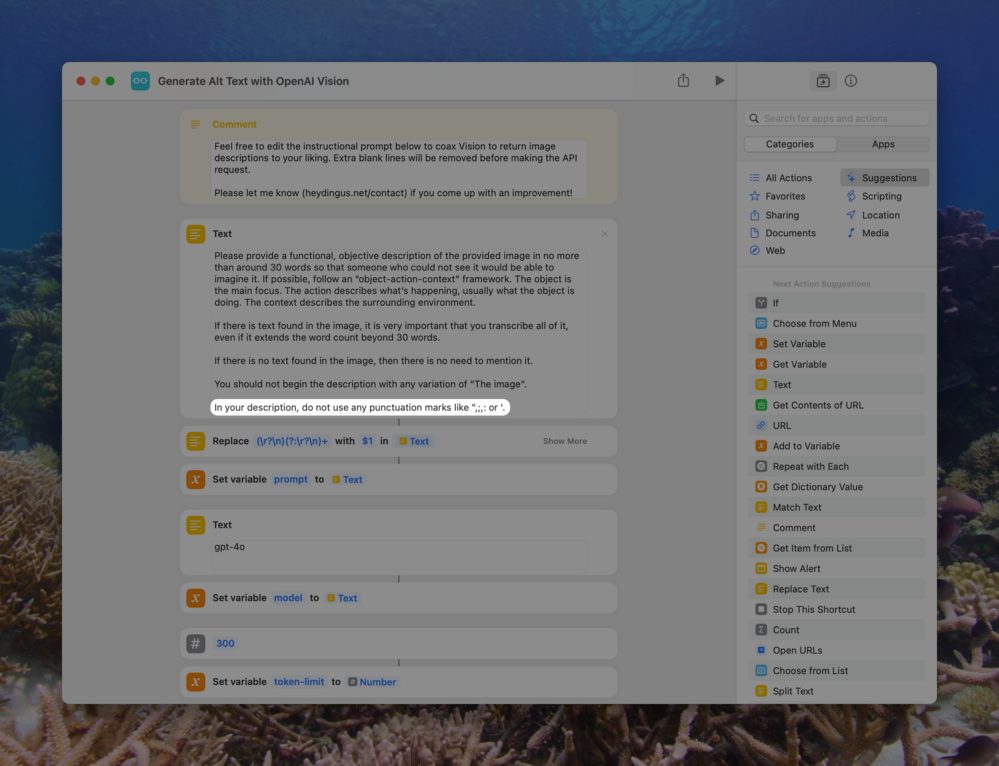
Oh, and I’ve also added one line to my instructions action, thanks to a suggestion by @frank, that helps prevent some parsing issues. You can update that on your own too! Whenever I have a next update for the shortcut I’ll include those improvements, but it’s not worth making you go through that whole process when you can just do it yourself. (Yay open source!)

Text editor displays instructional text surrounded by various automation controls, including search options and action suggestions. Background features an underwater ocean scene with coral and fish. The highlighted text instructs the model not to use specific punctuation marks in its response.

In your description, do not use any punctuation marks like ",;,: or '.

|
…
Embed
jarrod
jarrod

@pratik Let me know! It’s been working for me.

|
…
Embed
In reply to
jomalo
jomalo

@jarrod Done. Many thanks

|
…
Embed
ericmwalk
ericmwalk

@jarrod nice! Updated and worked perfectly… Thanks for continuing to update this and sharing.

|
…
Embed
jarrod
jarrod

@ericmwalk You betcha!

|
…
Embed