V_
V_
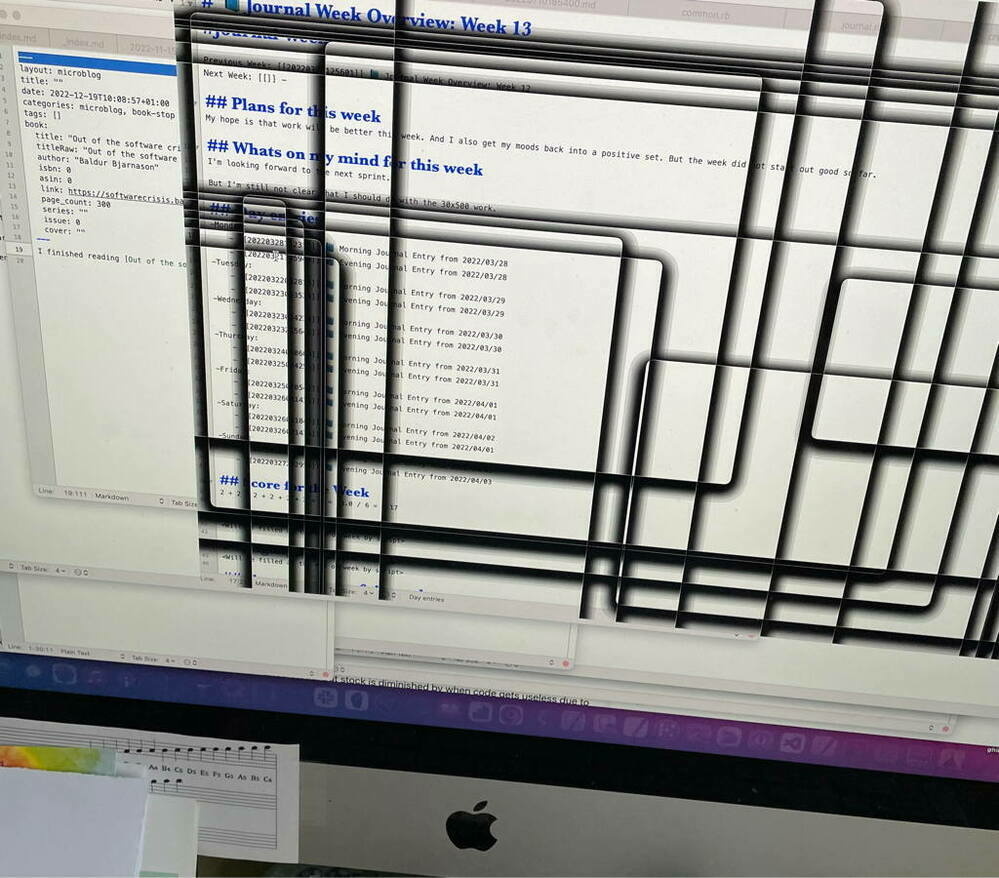
Should I be worried about these visual artifacts on my computer screen? They happen randomly when I switch between applications. And come and go (flickering), the computer is not reacting to any inputs while it is happening (image of my desktop showing Black outlines).

Should I be worried about these visual artifacts on my computer screen? They happen randomly when I switch between applications. And come and go (flickering), the computer is not reacting to any inputs while it is happening (image of my desktop showing Black outlines).

|
Embed
Progress spinner
In reply to
V_
V_

@pimoore its a late 2014 model – I think one of the first retina ones. I was also thinking that it could be the graphics card. But it could also be the WindowServer, it mostly happens when I have many windows open and are switching between apps fast. And yes the retentions is also an issue. luckily it does not bother me to much, as the dock does hide it :-) It is only visible as during the glitch the Dock gets hidden somehow.

|
Embed
Progress spinner
V_
V_

@pimoore for a start I’ve started closing my finder window. I ralized that I had a lot of them open. I hope, that I get around a clean install but when it does not get better that would then be the next thing to do – or perhaps a restart first as well.

|
Embed
Progress spinner
V_
V_

@pimoore good recommendation – I have activated it and keep an eye out for it. The issue does not happen so often, so it could be hard to test it. I’ve also seen the “reduce transarency” option as well, could also be helpful. But have not activated it yet.

|
Embed
Progress spinner